Amazon Product Photography Requirements: Complete 2025 Compliance Guide
📑 Table of Contents
- What Are Amazon Product Photography Requirements?
- Why Amazon Has Strict Image Requirements
- Amazon Main Image Requirements (Critical)
- Amazon Additional Image Requirements
- Common Amazon Image Rejection Reasons
- Technical Specifications Breakdown
- Category-Specific Requirements
- How to Create Amazon-Compliant Images
- Best Tools for Amazon Product Photography
- Real Seller Success Stories
- Frequently Asked Questions
- Conclusion
What Are Amazon Product Photography Requirements?
Amazon product photography requirements are a set of strict technical and visual guidelines that every product image must meet to be listed on Amazon's marketplace.
These requirements cover:
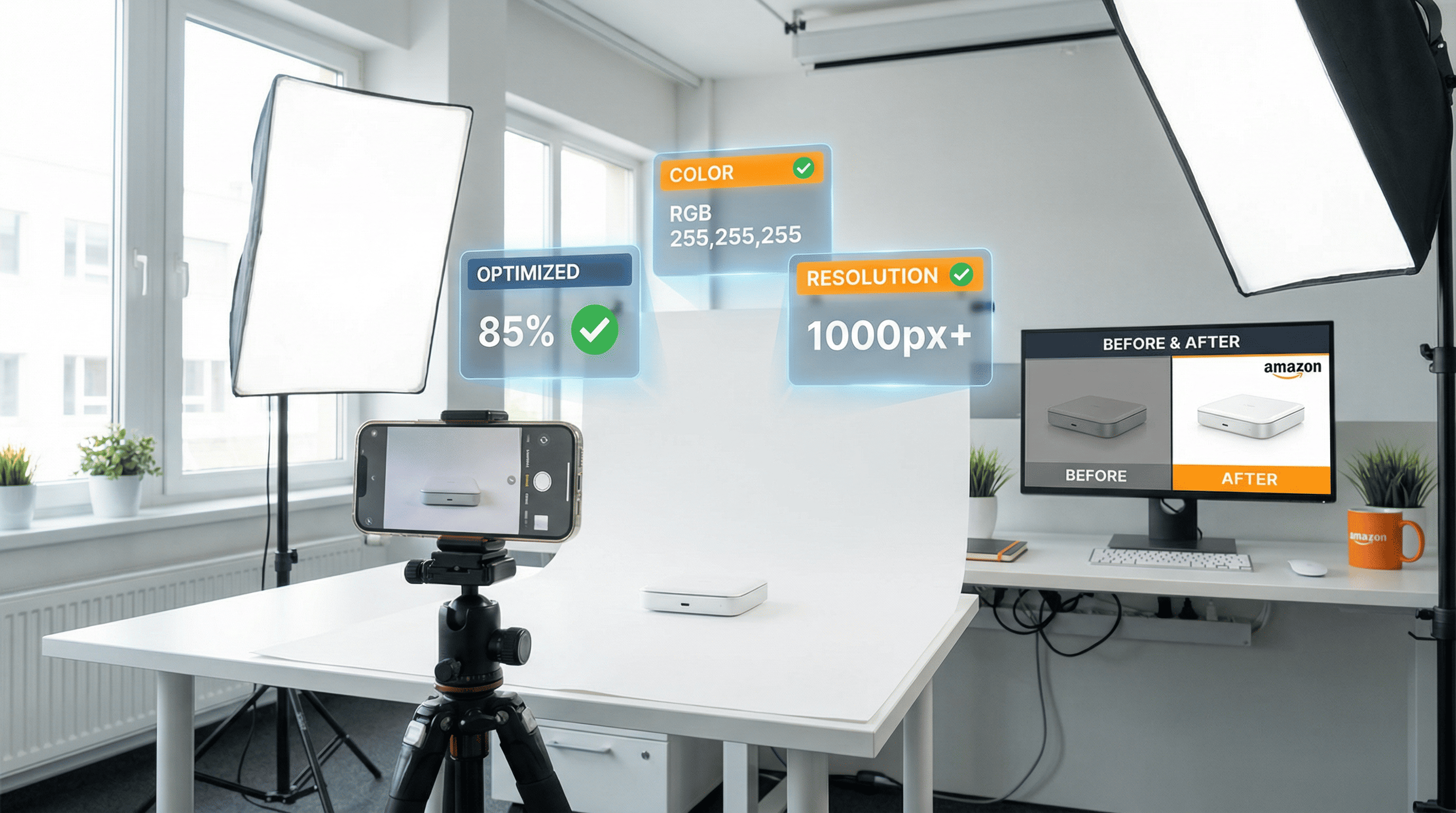
- Background specifications (pure white for main images)
- Image dimensions and resolution (minimum 1000px longest side)
- Product frame coverage (85% minimum)
- File format and size (JPEG/TIFF preferred)
- Prohibited elements (no watermarks, text, props)
- Color accuracy and lighting standards
Amazon enforces these requirements through both automated systems and human reviewers. Non-compliant images are rejected immediately, delaying your listing by days or weeks.
💡 Critical Fact: Amazon's A9 algorithm gives higher visibility to listings with high-quality, compliant images. Proper photography directly impacts your search ranking.
Why Amazon Has Strict Image Requirements
Customer Experience Consistency
Amazon wants every product page to look professional and trustworthy. Consistent image standards create a seamless shopping experience across millions of products.
Reduced Return Rates
Clear, accurate product images reduce customer disappointment and returns. Amazon found that compliant images decrease return rates by up to 40%.
Fair Competition
Standardized images prevent sellers from gaining unfair advantages through misleading photography, promotional graphics, or deceptive presentations.
Mobile Optimization
Over 70% of Amazon shopping happens on mobile devices. Strict image requirements ensure products display perfectly on all screen sizes.
Amazon Main Image Requirements (Critical)
The main image (first image) has the strictest requirements because it appears in search results and is the first thing customers see.
✅ Main Image Must-Follow Rules:
| Requirement | Specification | Why It Matters |
| Background | Pure white (RGB 255, 255, 255) | Creates clean, professional look |
| Product Coverage | 85% or more of image frame | Ensures product is clearly visible |
| File Format | JPEG (.jpg) or TIFF (.tif) preferred | Optimal quality and compatibility |
| Resolution | Minimum 1000 pixels (longest side) | Enables zoom feature |
| Recommended Size | 2000+ pixels for best zoom | Better customer experience |
| Color Mode | sRGB or CMYK | Accurate color reproduction |
| Product Only | No props, models, or accessories | Focus entirely on product |
| No Text | No watermarks, logos, or graphics | Professional appearance |
| Entire Product Visible | Nothing cropped or cut off | Shows complete product |
| Orientation | Product right-side up | Natural viewing angle |
❌ Main Image Restrictions:
- ❌ NO colored backgrounds
- ❌ NO lifestyle or environmental settings
- ❌ NO text or promotional badges ("Sale!", "New!")
- ❌ NO borders, watermarks, or logos
- ❌ NO models (except for jewelry, some accessories)
- ❌ NO multiple products (unless sold as a set)
- ❌ NO props or decorative elements
- ❌ NO drawings or illustrations (actual product photos only)
🚨 Violation Example:
Main image with beige background instead of white → REJECTED
Main image with "50% OFF" text overlay → REJECTED
Main image showing product + free bonus item → REJECTED
Amazon Additional Image Requirements
You can upload up to 9 total images (1 main + 8 additional). Additional images have more flexibility but still have rules.
What Additional Images Can Include:
✅ Lifestyle shots - Product in real-world settings
✅ Infographics - Features, dimensions, benefits with text
✅ Multiple angles - Front, back, side, top views
✅ Detail shots - Zoom on textures, materials, features
✅ Size/scale context - Product held by person or with measurements
✅ Packaging - What customer receives
✅ Usage demonstrations - How to use the product
✅ Comparison charts - vs. competitor features
Additional Image Best Practices:
| Image Slot | Recommended Content |
| Image 1 | Main image (white background) |
| Image 2 | Alternate angle (white background) |
| Image 3 | Product in use (lifestyle) |
| Image 4 | Feature infographic |
| Image 5 | Detail/close-up shot |
| Image 6 | Size/dimension guide |
| Image 7 | Packaging/unboxing |
| Image 8 | Additional lifestyle or variant |
Technical Requirements (All Images):
- Minimum 1000 pixels on longest side
- Maximum 10,000 pixels on longest side
- File size under 10 MB
- JPEG, TIFF, PNG, or GIF (non-animated)
- sRGB or CMYK color mode
- Accurate color representation
Common Amazon Image Rejection Reasons
Based on seller reports and Amazon's rejection notices, here are the top reasons listings get rejected:
1. Background Not Pure White (45% of rejections)
- "Off-white" or cream backgrounds (RGB 252, 252, 252) get rejected
- Shadows creating gray areas
- Gradient backgrounds
Fix: Use RGB 255, 255, 255 exactly
2. Product Fills Less Than 85% of Frame (25%)
- Too much white space around product
- Product appears too small
Fix: Crop tighter or use larger product image
3. Text or Graphics on Main Image (15%)
- Brand logos visible on product
- Watermarks
- "New" or "Sale" badges
Fix: Remove all text; use only pure product photo
4. Low Resolution (8%)
- Images under 1000 pixels
- Blurry or pixelated photos
Fix: Use high-resolution camera; minimum 1000px
5. Prohibited Props or Accessories (4%)
- Mannequins showing in clothing photos
- Decorative backgrounds
- Products not included in purchase
Fix: Show only what customer receives
6. Multiple Products When Selling One (3%)
- Showing color variations in main image
- Bonus items visible
Fix: Show only the single product being sold
Technical Specifications Breakdown
Resolution & Zoom Feature
Amazon's zoom feature activates when images are 1000+ pixels on the longest side. Zoom increases conversion rates by 30–40%.
Recommended specifications:
- Minimum: 1000 x 1000 pixels
- Good: 2000 x 2000 pixels
- Best: 2560 x 2560 pixels
- Maximum: 10,000 x 10,000 pixels
File Formats
| Format | Recommended | Notes |
| JPEG (.jpg) | ✅ Yes | Best for most products |
| TIFF (.tif) | ✅ Yes | High quality, larger files |
| PNG (.png) | ⚠️ Acceptable | Larger file size |
| GIF (.gif) | ⚠️ Acceptable | No animations allowed |
File Naming Convention
Amazon recommends: [ASIN].[variant].[file type]
Example: B07XYZ1234.MAIN.jpg
This isn't mandatory but helps with organization.
Color Accuracy
- Use sRGB color space for web display
- Avoid over-saturation
- Match product's true colors
- Consistent white balance across all images
Category-Specific Requirements
Some categories have additional rules:
Apparel & Accessories
- Main image: Product on plain white background OR invisible mannequin
- Mannequin cannot show (use ghost mannequin technique)
- Models allowed for jewelry, watches, sunglasses
- Shoes must show single shoe at 45° angle
Books
- Front cover only for main image
- No promotional stickers or badges visible
- Book must fill 100% of frame edge-to-edge
Electronics
- Product powered off (no glowing screens)
- All accessories must be included in image if bundled
- No promotional packaging in main image
Beauty & Personal Care
- Product packaging as customer receives it
- No lifestyle hands/models in main image
- Actual product, not renderings
Home & Kitchen
- Product must be the focal point
- No staged lifestyle scenes in main image
- Kitchen appliances shown from front angle
How to Create Amazon-Compliant Images
Option 1: DIY Product Photography
Equipment Needed:
- Smartphone camera (12MP+) or DSLR
- White backdrop/sweep (seamless paper or fabric)
- Lighting kit or natural window light
- Tripod for stability
- Photo editing software (Photoshop, GIMP)
Step-by-Step Process:
- Setup white backdrop - Ensure pure white, no wrinkles
- Position product - Center, right-side up, fills 85% of frame
- Light evenly - Avoid harsh shadows on background
- Shoot high-resolution - 2000+ pixels recommended
- Edit background - Make pure white (RGB 255, 255, 255)
- Crop appropriately - Square format, product fills frame
- Save correctly - JPEG, sRGB, under 10MB
- Upload and verify - Check Amazon's image guidelines checker
Cost: ₹5,000–15,000 initial equipment investment
Option 2: Professional Product Photography
Services Include:
- Professional lighting setup
- Multiple angles and variations
- Background removal and editing
- Amazon-compliant formatting
- Infographic creation
Cost: ₹500–2,000 per product (India)
Turnaround: 2–5 days
Option 3: AI Product Photography
Modern Solution:
- Upload basic product photo
- AI removes background to pure white
- Automatically centers and scales to 85%+
- Creates additional lifestyle images
- Formats to Amazon specifications
Cost: ₹25–100 per product
Turnaround: 5–15 minutes
💡 Recommended Tool: RACHAVO offers Amazon-specific presets that automatically format images to exact compliance standards.
Best Tools for Amazon Product Photography
Background Removal Tools
| Tool | Price | Best For |
| Remove.bg | Free–₹799/mo | Quick background removal |
| Photoshop | ₹1,675/mo | Professional editing |
| Canva Pro | ₹499/mo | Infographics + editing |
| GIMP | Free | Budget alternative |
Amazon Compliance Checkers
- Amazon Image Guidelines Tool (free, built into Seller Central)
- Helium 10 Listing Analyzer (checks image compliance)
- Jungle Scout Image Validator (pre-upload verification)
AI Photography Platforms
RACHAVO
- Amazon-preset templates
- Auto white background (RGB 255, 255, 255)
- 85% frame fill automation
- Bulk processing
- Infographic creator
Pricing: ₹999–2,499/month
Website: www.rachavo.com
Other Options:
- Pixelcut - Mobile app for product photos
- Claid.ai - Automated image enhancement
- PhotoRoom - AI background removal
Real Seller Success Stories
Electronics Seller - Mumbai
Challenge: 200 product listings rejected due to gray backgrounds
Solution: Used AI tool to convert all images to pure white background
Results:
- ✅ 100% listing approval rate
- ✅ 35% increase in click-through rate
- ✅ 28% boost in conversion rate
- ✅ Saved ₹80,000 in re-photography costs
Fashion Brand - Bangalore
Challenge: Apparel main images showing models (violation)
Solution: Implemented ghost mannequin technique with professional photography
Results:
- ✅ All 150 listings approved first-time
- ✅ 42% improvement in search visibility
- ✅ 50% reduction in return rates
- ✅ Buy Box win rate increased to 78%
Home Decor Seller - Delhi
Challenge: Low-resolution images without zoom feature
Solution: Re-shot all products at 2500x2500 pixels
Results:
- ✅ Zoom feature activated on all listings
- ✅ 33% increase in conversion rate
- ✅ Customer complaints dropped by 60%
- ✅ Monthly revenue up by ₹2.5 lakhs
Frequently Asked Questions
Can I use my smartphone for Amazon product photography?
Yes, if your phone has a 12MP+ camera. Ensure good lighting, white background, and 1000+ pixel resolution. Many successful sellers use iPhone or flagship Android phones.
What exactly is "pure white" for Amazon?
RGB 255, 255, 255 is pure white. In hex code: #FFFFFF. Even RGB 252, 252, 252 (off-white) may get rejected. Use photo editing software to set exact values.
How many images should I upload per product?
Upload all 9 available slots (1 main + 8 additional). Listings with 7+ images convert 30% better than those with 3–4 images.
Can I show my brand logo in the main image?
No - no text, logos, or watermarks allowed in main image. You can show logos in additional images if they're printed on the actual product.
What if my product IS multiple items (like a set)?
If you're selling a set, all items in the set should appear in the main image on white background. But if it's a single item with a bonus, show only the main product.
Do I need professional equipment?
Not necessarily. Good natural lighting + white backdrop + smartphone can produce compliant images. Professional equipment helps but isn't mandatory.
How do I create infographic images?
Use Canva, Adobe Illustrator, or specialized tools like Helium 10 Listing Builder. Infographics should highlight key features, dimensions, and benefits clearly.
Will better images really increase sales?
Absolutely. Amazon reports that high-quality images can increase conversion rates by up to 40%. Images are often the deciding factor for online purchases.
🎯 Conclusion
Amazon product photography requirements might seem strict, but they exist for good reason: to create a trustworthy, consistent shopping experience that benefits both customers and sellers.
Key Takeaways:
✅ Main image must have pure white background (RGB 255, 255, 255)
✅ Product must fill 85%+ of frame for visibility
✅ Minimum 1000 pixels on longest side (2000+ recommended)
✅ No text, watermarks, or graphics on main image
✅ Use all 9 image slots for maximum conversion
✅ Lifestyle and infographic images allowed in additional slots
✅ High-quality images increase conversions by 30–40%
✅ Non-compliant images delay listings and hurt rankings
Your Action Plan:
If you're new to Amazon:
- Study these requirements thoroughly before creating images
- Use Amazon's built-in image checker before uploading
- Invest in good product photography from day one
If you have existing listings:
- Audit all product images for compliance
- Re-shoot or edit non-compliant images immediately
- Add lifestyle and infographic images to boost conversions
If you manage many products:
- Consider AI photography tools for scalability
- Create standard operating procedures for image creation
- Use batch editing tools to ensure consistency
The Bottom Line
Compliant product photography isn't just about avoiding rejection—it's about maximizing your visibility, conversion rate, and customer satisfaction on the world's largest marketplace.
Poor images cost you money every single day through:
- Lower search rankings
- Reduced click-through rates
- Decreased conversions
- Higher return rates
- Lost Buy Box opportunities
Investing in Amazon-compliant, high-quality product photography is one of the highest-ROI activities any Amazon seller can undertake.
Ready to Create Amazon-Compliant Product Images?
Stop losing sales to image rejections and low-quality photos. Get your products photographed the right way—the first time.
👉 Try RACHAVO's Amazon Product Photography Solution
✓ Automatic pure white backgrounds (RGB 255, 255, 255)
✓ Perfect 85% frame fill every time
✓ Amazon compliance guaranteed
✓ Lifestyle and infographic creation
✓ Bulk processing for multiple products
✓ 2000+ pixel resolution
Visit: www.rachavo.com
Upload your first product photo and get Amazon-compliant images in 10 minutes. Free trial available—no credit card required.
Share this Guide with fellow Amazon sellers who struggle with image requirements!