Product Photography Backgrounds: Complete Guide for E-commerce Sellers
📑 Table of Contents
- Why Backgrounds Matter for Sales
- White Backgrounds: The E-commerce Standard
- Colored and Textured Backgrounds
- Lifestyle and Contextual Backgrounds
- DIY Background Solutions
- Professional Background Options
- Background Mistakes That Kill Sales
- Marketplace-Specific Requirements
- Quick Background Selection Guide
Why Backgrounds Matter for Sales
Backgrounds aren't just decoration—they directly impact your bottom line.
The Psychology of Backgrounds:
1. Focus and Attention
- Clean backgrounds direct attention to product
- Cluttered backgrounds distract and confuse
- Customers decide in 2-3 seconds—backgrounds shouldn't slow them down
2. Perceived Quality
- Professional backgrounds = professional product
- Amateur backgrounds = questionable quality
- Customers judge product value by presentation
3. Context and Lifestyle
- Backgrounds tell a story
- Help customers visualize product in their life
- Create emotional connection
Impact on Sales Metrics:
Conversion Rate:
- Products with clean white backgrounds convert 20-30% better for main images
- Lifestyle backgrounds in additional images increase conversion by 15-25%
- Inconsistent backgrounds decrease trust and sales
Return Rate:
- Accurate background representation reduces returns
- White backgrounds show true colors (fewer "not as shown" returns)
- Context backgrounds show realistic size and scale
Click-Through Rate:
- White backgrounds in search results = higher CTR (marketplace standard)
- Creative backgrounds in social media = higher engagement
- Right background for right platform = better performance
Pro Tip: Use white backgrounds for marketplace main images, creative backgrounds for additional images and social media.
White Backgrounds: The E-commerce Standard
White backgrounds are the gold standard for product photography. Here's why and how.
Why White Backgrounds Work:
1. Marketplace Compliance
- Amazon, Flipkart require pure white for main images
- Universal standard across e-commerce
- Ensures listing approval
2. Product Focus
- Zero distraction
- Product colors stand out
- Customers see exactly what they're buying
3. Professional Appearance
- Clean, trustworthy look
- Premium product perception
- Consistent with major brands
4. Versatility
- Works for any product type
- Easy to edit and retouch
- Matches any website design
Achieving Pure White Backgrounds:
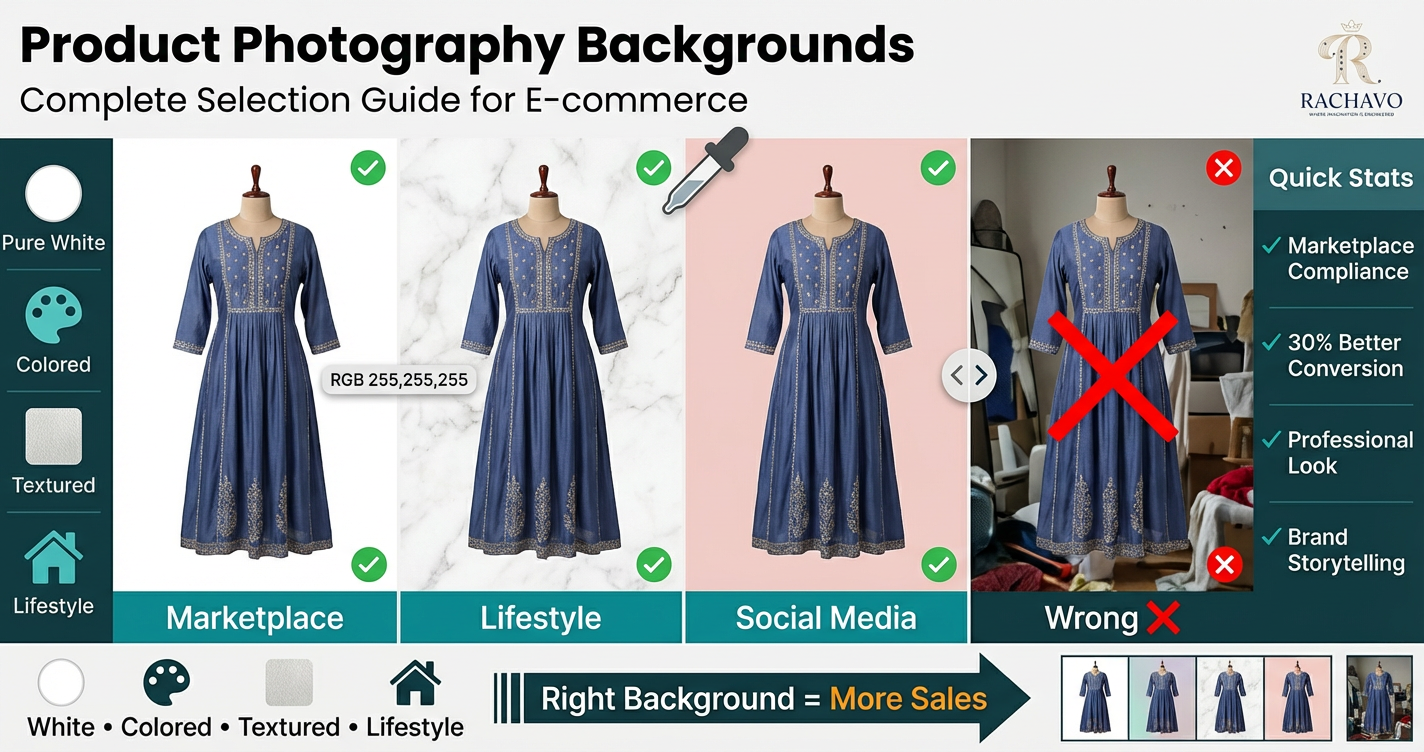
The Standard: RGB 255, 255, 255
This isn't just "white"—it's pure white. Off-white, cream, or light grey will get rejected.
Method 1: Shoot on White Background
Materials:
- White seamless paper/backdrop
- White foam board
- White fabric (wrinkle-free)
Lighting Setup:
- Overexpose background slightly (makes it pure white)
- Light the background separately from product
- Use two lights: one on product, one on background
Camera Settings:
- Shoot in RAW format for editing flexibility
- Slightly overexpose (+0.3 to +0.7)
- Adjust white balance to ensure neutral white
Challenge: Achieving true RGB 255,255,255 in-camera is difficult
Method 2: Post-Production White Background
Process:
- Shoot on Light Background
- Light grey, off-white, or any pale color
- Ensure even lighting
- Clean, simple background
- Remove/Replace Background
- Use editing software (Photoshop, Snapseed, Remove.bg)
- Select and delete background
- Replace with pure white layer (RGB 255,255,255)
- Refine Edges
- Clean up edge selection
- Remove background color spill
- Ensure product edges are sharp
Tools:
- Photoshop: Pen tool, Magic Wand, Select and Mask
- Remove.bg: AI automatic background removal (free basic, paid for high-res)
- Canva: Background remover tool (Canva Pro)
- Snapseed: Healing tool and selective adjustments
- AI Tools: RACHAVO, Pixelcut, PhotoRoom (automated solutions)
Pro Tip: AI background removal tools have improved dramatically. They save hours of manual editing work.
Method 3: Light Tent/Photo Box
What it is: Translucent white tent with built-in lighting
How it works:
- Place product inside tent
- Lights shine through translucent walls
- Creates soft, even, white background naturally
Advantages:
- Consistent results
- Minimal editing needed
- Good for small products (jewelry, accessories)
Limitations:
- Size constraints (most tents 24"-40" cubes)
- Not ideal for clothing on models
- Can look flat without additional lighting
Investment: ₹1,000-5,000 depending on size and quality
White Background Best Practices:
DO:
- ✅ Verify RGB values are exactly 255,255,255
- ✅ Remove ALL shadows (including subtle ones)
- ✅ Keep edges clean and sharp
- ✅ Ensure consistent white across all product images
- ✅ Light background separately from product
DON'T:
- ❌ Use off-white, cream, or light grey
- ❌ Leave visible shadows on background
- ❌ Over-edit causing halos around product
- ❌ Allow background to look flat/dead (product should still have dimension)
Colored and Textured Backgrounds
While white is mandatory for main images, colored backgrounds can enhance additional images.
When to Use Colored Backgrounds:
Best For:
- Additional product images (not main image)
- Social media posts
- Website banners
- Brand storytelling
- Emotional connection
Product Categories:
- Luxury items (deep colors convey premium)
- Artistic products (creative backgrounds)
- Seasonal items (themed colors)
- Lifestyle brands (brand color backgrounds)
Color Psychology for Backgrounds:
Neutral Colors:
Light Grey:
- Modern, minimalist
- Doesn't compete with product
- Good for colorful products
- Professional without being stark
Beige/Cream:
- Warm, approachable
- Vintage, handmade feel
- Good for natural/organic products
- Softer than pure white
Black:
- Dramatic, premium
- Luxury positioning
- Makes colors pop
- Good for jewelry, electronics
- Can make products appear expensive
Bold Colors:
Pastel Colors (Pink, Blue, Yellow, Mint):
- Playful, youthful
- Good for fashion, kids' products
- Instagram-friendly
- Creates mood and vibe
Brand Colors:
- Reinforces brand identity
- Consistent brand experience
- Use as accent, not overwhelming
Complementary Colors:
- Colors opposite on color wheel
- Makes product colors pop
- Red product on green background
- Blue product on orange background
Textured Backgrounds:
Natural Textures:
Wood:
- Rustic, authentic feel
- Good for handmade, natural products
- Warm and inviting
- Works for home decor, organic products
Marble:
- Elegant, sophisticated
- Luxury products, cosmetics
- Clean but interesting
- Popular on social media
Fabric/Linen:
- Soft, tactile feel
- Good for clothing, bedding
- Adds dimension
- Avoid busy patterns
Concrete/Industrial:
- Modern, urban
- Edgy, contemporary products
- Neutral but textured
- Good for men's products, tech
Creative Textures:
Flowers/Greenery:
- Natural, fresh
- Seasonal products
- Beauty, wellness items
- Feminine products
Metallic:
- Shimmer, luxury
- Special occasion products
- Festive items
- Small doses for accent
Texture Guidelines:
DO:
- ✅ Keep texture subtle (shouldn't overpower product)
- ✅ Ensure texture complements product aesthetic
- ✅ Use high-quality textures (no pixelation)
- ✅ Maintain consistent style across product line
DON'T:
- ❌ Use busy, distracting patterns
- ❌ Mix multiple textures in one image
- ❌ Let texture compete with product for attention
- ❌ Use low-quality stock textures
Lifestyle and Contextual Backgrounds
Lifestyle backgrounds show products in real-world settings, helping customers visualize use.
Types of Lifestyle Backgrounds:
1. Interior Settings
For Home Decor:
- Living room, bedroom, kitchen
- Shows product in intended space
- Helps visualize size and fit
- Creates aspirational feel
For Fashion:
- Home settings (casual wear)
- Dressing room (trying on context)
- Bedroom (nightwear, loungewear)
Tips:
- Keep settings clean and uncluttered
- Use neutral, timeless decor
- Ensure good natural lighting
- Avoid dated styles
2. Outdoor Settings
For Clothing:
- Streets, cafes (casual wear)
- Gardens, parks (ethnic wear, dresses)
- Urban backgrounds (contemporary fashion)
- Beach, nature (resort wear)
For Accessories:
- Travel contexts (bags, luggage)
- Outdoor activities (sports accessories)
- Social settings (party wear accessories)
Tips:
- Golden hour lighting (early morning, late afternoon)
- Avoid harsh midday sun
- Choose timeless locations
- Blur background slightly (focus on product)
3. Workplace/Professional Settings
For Formal Wear:
- Office environments
- Conference rooms
- Professional settings
Benefits:
- Shows appropriate usage
- Helps customer visualize wearing to work
- Justifies product value
4. Event Settings
For Ethnic/Occasion Wear:
- Wedding venues
- Festival settings
- Party environments
- Cultural celebrations
For Indian Fashion:
- Traditional settings for ethnic wear
- Festive decorations for occasion wear
- Cultural contexts for traditional products
Choosing the Right Lifestyle Background:
Match Background to Product Purpose:
| Product Type | Ideal Background |
| Casual Kurti | Cafe, home, market |
| Wedding Lehenga | Decorated venue, traditional setting |
| Office Wear | Professional environment |
| Lounge Wear | Home, relaxed setting |
| Party Dress | Restaurant, event space |
| Gym Wear | Fitness environment, outdoors |
| Kids Clothing | Playground, home, school |
Lifestyle Background Best Practices:
DO:
- ✅ Ensure background supports product story
- ✅ Keep background slightly out of focus (product remains sharp)
- ✅ Use authentic, realistic settings
- ✅ Show product in actual use
- ✅ Include complementary props (not competing items)
DON'T:
- ❌ Use overly staged, fake-looking settings
- ❌ Include distracting elements
- ❌ Use low-quality or dated environments
- ❌ Forget about product being the star
- ❌ Ignore background lighting
Pro Tip: Lifestyle images work best as images 4-6 in your product listing sequence. Lead with clean white backgrounds, then show context.
DIY Background Solutions
Professional backgrounds don't require professional budgets. Create stunning backgrounds with common materials.
White Background DIY Options:
1. Poster Board/Chart Paper
- Cost: ₹50-150 for large sheets
- Size: 20"x30" to 40"x60"
- Pros: Cheap, available everywhere, matte finish
- Cons: Shows creases, limited size, not reusable
- Best for: Small products, single-use shoots
2. Foam Board
- Cost: ₹100-400 per board
- Size: 30"x40", 40"x60"
- Pros: Sturdy, reusable, smooth surface, rigid (stands upright)
- Cons: Can show dents, limited size
- Best for: Multiple shoots, small to medium products
- Pro Tip: Buy 2-3 boards to create seamless corner setup
3. White Bedsheet/Fabric
- Cost: ₹200-800
- Size: Any size available
- Pros: Large coverage, drapes well, reusable
- Cons: Shows wrinkles, needs ironing, can have texture
- Best for: Large products, clothing on models
- Pro Tip: Use matte cotton, not shiny satin
4. White Wall
- Cost: FREE (if you have one)
- Pros: Free, large, permanent
- Cons: Fixed location, may have texture, can't adjust
- Best for: Products that can shoot vertically, flat lays
5. Seamless Paper Roll
- Cost: ₹1,500-4,000 for roll
- Size: 4-9 feet wide, 30+ feet long
- Pros: Professional, seamless, large coverage, sweep creates no-crease background
- Cons: Higher initial cost, needs support system
- Best for: Professional repeated use, large products, models
- Pro Tip: Creates beautiful curved backdrop (no visible horizon line)
Colored/Textured Background DIY:
1. Craft Paper (Colored)
- Cost: ₹30-100 per sheet
- Colors: Wide variety available
- Best for: Small products, testing different colors
2. Painted Boards
- DIY: Buy foam board + acrylic paint
- Cost: ₹200-500 total
- Create: Any color you want
- Best for: Signature brand background color
3. Fabric Backdrops
- Materials: Canvas, muslin, velvet
- Cost: ₹300-1,500
- Create: Textured, colored, draped backgrounds
- Best for: Jewelry, small products
4. Natural Materials:
Wood Planks/Boards:
- Source: Hardware stores, old furniture
- Cost: ₹200-800
- Look: Rustic, natural
- Best for: Handmade products, natural items
Marble Contact Paper:
- Cost: ₹150-400 per roll
- Apply to board/table
- Look: Elegant marble texture
- Best for: Cosmetics, jewelry, luxury items
Tile Samples:
- Source: Tile shops (often free samples)
- Look: Various textures
- Best for: Small products
5. Paper Textures:
- Textured scrapbook paper (₹20-80 per sheet)
- Wrapping paper with subtle patterns
- Tissue paper for soft backgrounds
Sweep/Infinity Background Setup:
What it is: Curved background with no visible horizon line (seamless transition from vertical to horizontal)
DIY Creation:
Method 1: Foam Board Sweep
- Take two foam boards
- Tape one vertically to wall/stand
- Curve second board from bottom of first to table
- Secure with tape or clips
- Place product on horizontal section
Method 2: Paper Roll Sweep
- Hang paper roll high on wall or stand
- Pull paper down and forward
- Let it curve naturally onto floor/table
- Secure front end with tape
- Creates professional seamless look
Benefits:
- No visible background lines
- Professional appearance
- Product appears to float
- Clean, distraction-free
Props and Surface Materials:
Surfaces for Flat Lays:
- Wooden boards/tables
- Marble tiles
- Fabric (linen, cotton)
- Colored paper
Props (Use Sparingly):
- Complementary accessories
- Natural elements (leaves, flowers)
- Lifestyle items (coffee cup, books)
- Brand elements
Rule: Props should enhance, never compete with product
Professional Background Options
When DIY isn't enough, professional options offer consistency and convenience.
Collapsible Backgrounds:
Pop-Up Backgrounds:
- Cost: ₹1,500-5,000
- Size: Various (3x3 ft to 5x7 ft)
- Colors: White, black, grey, multiple options
- Pros: Portable, quick setup, wrinkle-free, reversible
- Cons: Limited size, can be reflective
- Best for: Mobile shoots, small to medium products
Vinyl Backgrounds:
Printed Vinyl:
- Cost: ₹2,000-8,000
- Options: Solid colors, wood textures, marble, custom prints
- Sizes: 2x2 ft to 6x8 ft
- Pros: Durable, easy to clean, realistic textures, waterproof
- Cons: Can be reflective, shows creases if rolled
- Best for: Flat lay photography, food, products
Matte vs Glossy:
- Matte: Better for most products (no reflections)
- Glossy: Can create unwanted glare
Backdrop Stands:
T-Stand/Crossbar System:
- Cost: ₹2,500-8,000
- Purpose: Holds seamless paper or fabric
- Adjustable: Height and width
- Pros: Professional, versatile, stable
- Best for: Serious sellers, regular shoots
Backdrop Rolls (Seamless Paper):
Professional Seamless:
- Brands: Savage, Colorama (imported), local options
- Cost: ₹2,000-6,000 per roll
- Sizes: 4 ft, 6 ft, 9 ft widths
- Length: 30+ feet
- Colors: 50+ color options
- Pros: Professional standard, no seams, replaceable
- Cons: Uses up (tear off dirty sections), needs storage space
Muslin/Canvas Backdrops:
Hand-Painted Backdrops:
- Cost: ₹3,000-15,000
- Look: Artistic, textured, unique
- Pros: Beautiful, professional, one-of-a-kind
- Cons: Expensive, needs careful storage, heavy
- Best for: Brand photography, signature look
Light Tents/Photo Boxes:
All-in-One Solution:
- Cost: ₹1,500-8,000
- Includes: Tent + lights + multiple background colors
- Sizes: 16" to 48" cubes
- Pros: Complete setup, consistent lighting, easy white backgrounds
- Cons: Size limitations, can look flat
- Best for: Small products (jewelry, accessories, gadgets)
When to Invest in Professional Backgrounds:
Invest if you:
- ✅ Shoot products regularly (weekly or more)
- ✅ Have consistent photography style/brand
- ✅ Sell premium products (professional photos justify price)
- ✅ Want efficient, repeatable workflow
- ✅ Plan long-term e-commerce business
Stick with DIY if you:
- ⚠️ Shoot occasionally
- ⚠️ Testing product categories
- ⚠️ Very limited budget
- ⚠️ Limited storage space
Background Mistakes That Kill Sales
Avoid these common background errors.
Mistake 1: Cluttered Backgrounds
Problem: Too many elements, busy patterns, distracting objects
Impact:
- Customer doesn't focus on product
- Looks unprofessional
- Confusing shopping experience
Fix:
- Simplify ruthlessly
- Remove everything non-essential
- Use plain backgrounds for main images
Mistake 2: Off-White Instead of Pure White
Problem: Cream, beige, light grey backgrounds claiming to be white
Impact:
- Marketplace rejection (Amazon, Flipkart)
- Inconsistent look across catalog
- Products appear dingy
Fix:
- Use RGB 255,255,255 exactly
- Check with color picker tool
- Edit background to pure white in post-production
Mistake 3: Visible Shadows on Background
Problem: Product casts shadows on "white" background
Impact:
- Looks amateurish
- Can cause marketplace rejection
- Distracts from product
Fix:
- Light background separately
- Increase background exposure
- Remove shadows in editing
- Use sweep background (shadows fall behind product)
Mistake 4: Inconsistent Backgrounds Across Product Line
Problem: Each product shot on different background/setup
Impact:
- Unprofessional brand image
- Confusing customer experience
- Lower trust and credibility
Fix:
- Create standard photography setup
- Use same backgrounds for entire category
- Document your setup (lighting, position, settings) for consistency
Mistake 5: Background Color Spill
Problem: Colored background reflects onto product (especially white products)
Impact:
- Product appears discolored
- Colors not accurate
- Increases returns ("not as shown")
Fix:
- Use neutral backgrounds for white/light products
- Increase distance between product and background
- Correct color spill in editing
- Use flags/blockers to prevent light bounce
Mistake 6: Distracting Textures
Problem: Heavy textures that compete with product
Impact:
- Product details lost
- Customer attention divided
- Looks busy and unprofessional
Fix:
- Use subtle textures only
- Blur background slightly (shallow depth of field)
- Ensure product remains sharpest element
- Test: if texture is noticeable before product, it's too much
Mistake 7: Wrinkled or Dirty Backgrounds
Problem: Creases, stains, dust visible on background
Impact:
- Extremely unprofessional
- Suggests poor product quality
- Trust issues
Fix:
- Iron fabric backgrounds
- Replace or clean paper backgrounds
- Check background before every shoot
- Clean/dust regularly
Mistake 8: Wrong Background for Platform
Problem: Using lifestyle backgrounds for marketplace main images, white for Instagram
Impact:
- Marketplace rejection
- Lower social media engagement
- Missed opportunities on each platform
Fix:
- White background for marketplace main images
- Creative backgrounds for additional images
- Lifestyle backgrounds for social media
- Customize for each platform
Marketplace-Specific Requirements
Different platforms have different background rules.
Amazon India:
Main Image (Image 1):
- ✅ REQUIRED: Pure white background (RGB 255, 255, 255)
- ✅ No props, text, or graphics
- ✅ Product fills 85%+ of frame
- ❌ No colored or textured backgrounds
- ❌ No lifestyle settings
Additional Images (2-9):
- ✅ Any background allowed (white, colored, lifestyle)
- ✅ Props and context permitted
- ✅ Text and infographics okay
- ✅ Models and lifestyle shots encouraged
Flipkart:
Main Image:
- ✅ White or light grey background preferred
- ✅ More flexible than Amazon (slightly off-white accepted)
- ✅ Clean, professional look required
- ❌ No busy backgrounds
Additional Images:
- ✅ More creative freedom
- ✅ Lifestyle images encouraged
- ✅ Styled shots accepted
Meesho:
Main Image:
- ✅ White background strongly preferred
- ✅ Clean, simple backgrounds
- ✅ Product-focused
Additional Images:
- ✅ Very flexible
- ✅ Lifestyle and creative backgrounds welcomed
- ✅ Social-media style images work well
Your Own Website:
Complete Creative Freedom:
- Use consistent brand aesthetic
- Mix of white and lifestyle recommended
- High-quality matters more than specific color
- Tell your brand story through backgrounds
Social Media (Instagram, Facebook):
Instagram:
- ✅ Creative, aesthetic backgrounds perform best
- ✅ Lifestyle and contextual images
- ✅ Consistent brand color/theme
- ✅ Textured, interesting backgrounds
- ❌ Plain white can look boring (lower engagement)
Facebook:
- ✅ Mix of product and lifestyle
- ✅ Authentic, real-world backgrounds
- ✅ Less polished can feel more trustworthy
Pinterest:
- ✅ Lifestyle and aspirational backgrounds
- ✅ Vertical images (2:3 ratio)
- ✅ Beautiful, pin-worthy aesthetics
Platform Strategy:
Efficient Approach:
- Shoot main images on pure white (marketplace compliance)
- Shoot additional angles on white (versatile)
- Shoot lifestyle images with creative backgrounds (social + additional listing images)
- Repurpose across platforms as appropriate
Quick Background Selection Guide
Choose Your Background Based on:
Image Purpose:
| Purpose | Background |
| Marketplace main image | Pure white (RGB 255,255,255) |
| Marketplace additional | White, lifestyle, or creative |
| Social media | Lifestyle, textured, colored |
| Website hero image | Lifestyle, brand colors |
| Product details | White or neutral |
Product Type:
| Product | Best Background |
| Clothing (fashion) | White main + lifestyle additional |
| Jewelry | Black or white (makes metals pop) |
| Home decor | Lifestyle (room settings) |
| Electronics | White or black |
| Handmade/artisan | Textured (wood, fabric) |
| Luxury items | Black, dark colors, or elegant settings |
| Kids products | Bright colors, playful |
| Natural/organic | Natural textures (wood, stone) |
Brand Positioning:
| Brand Type | Background Style |
| Premium/Luxury | Black, dark colors, sophisticated settings |
| Affordable/Value | White, clean, simple |
| Eco/Natural | Natural textures, outdoor settings |
| Modern/Minimalist | White, grey, concrete |
| Traditional/Heritage | Textured, warm colors, cultural settings |
| Youthful/Trendy | Bright colors, creative, fun |
Decision Flowchart:
Is this for marketplace main image?
├─ YES → Pure white background (RGB 255,255,255)
└─ NO → Continue
Is this for social media?
├─ YES → Creative/lifestyle background
└─ NO → Continue
Is this for product details/features?
├─ YES → White or neutral background
└─ NO → Continue
Is this for brand storytelling?
└─ YES → Lifestyle/contextual background
Conclusion
Your background is more than what's behind your product—it's a strategic choice that impacts visibility, trust, and sales.
Key Takeaways:
✅ Pure white (RGB 255,255,255) is mandatory for marketplace main images
✅ Consistency matters across your product catalog
✅ Match background to purpose (compliance vs creativity)
✅ DIY solutions work for most sellers
✅ Invest in professional backgrounds when volume justifies it
✅ Lifestyle backgrounds boost engagement in additional images
✅ Simple beats complex in almost every scenario
Action Plan:
This Week:
- Audit your current product images
- Identify background issues (off-white, cluttered, inconsistent)
- Set up basic white background (poster board or foam board)
- Re-shoot main images with pure white background
This Month:
- Create 2-3 background setups (white, one textured, one lifestyle)
- Develop consistent photography style guide
- Re-shoot entire catalog with new backgrounds
- Upload improved images and track conversion impact
Ongoing:
- Maintain background quality (clean, wrinkle-free)
- Refresh lifestyle backgrounds seasonally
- Test different backgrounds for additional images
- Monitor which backgrounds drive best results
Remember: The best background is the one that makes your product shine and converts browsers into buyers.
Start with pure white for compliance, then get creative with additional images to tell your brand story.
Need perfect white backgrounds instantly? AI-powered tools can automatically remove and replace backgrounds with pure RGB 255,255,255 white—saving hours of editing and ensuring marketplace compliance every time.